




Follow these 8 easy steps: how to remove personal information from Google and other online sources. First, delete your data from Google. Next, search for yourself on Google and Google Images. Check your social media accounts as well.
If you spot personal details on any websites, try to get them removed. Be careful with your website domains, and make sure you manage your blogs to keep your privacy safe.
I may receive commissions from links in this post because This Online Web is reader-supported. Still, my reviews and opinions are always honest and unbiased.
People often say that once something is online, it stays there forever. Fortunately, that’s not always the case.
With information spreading so quickly online, it’s easy to feel anxious or overwhelmed about your visibility.
Sometimes, personal details pop up online when you least expect them, giving you plenty of reasons to want them removed from Google search results.
If this situation occurs to you, here are six practical steps you may undertake to eliminate your personal information from Google.
8 Steps to Erase Your Personal Data from Google
How to Remove Personal Information From Google
You don’t always have to delete the original content to get your personal details removed from Google search results.
These six steps will help you handle both the web pages you control and those you don’t:
Perform a comprehensive Google search: Start with a quick Google search
First, see how much of your information is out there before you do anything else.
Try searching for different versions of your name, including common misspellings, your full name, your business name, and details like your city or job title.
To find more hidden results, put your name in quotation marks, try using your initials, and use Google’s filters for Images, Videos, and News to get a full picture.
Optimize Your Search with Incognito Mode
To get unbiased search results, use incognito mode. This private browsing option helps you see what others see, not just results based on your history.
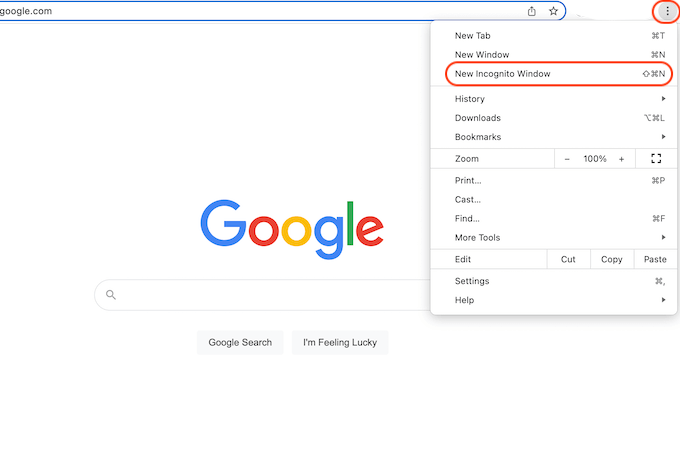
If you’re on Chrome OS, Windows, or Linux, press Ctrl + Shift + N to open an incognito window. On a Mac, use Command + Shift + N.
You can also click on “New Incognito Window” in Chrome’s menu.
If you’re signed into Google, try logging out or using a different browser profile to keep your results unbiased.
Remove Information from Your Own Web Pages
If you can edit or delete posts, profiles, or pages with your private information, go ahead and do so.
Make sure search engines update their results so your changes show up and your information no longer appears.
Reach Out to Webmasters of Unowned Websites
Contact web admins from sites you don’t control
If your information is on a site you don’t control, find the webmaster’s contact details and ask them to remove your personal info.
When you reach out, be clear and polite. Explain why you want your information removed.
Contact Google Directly
Google now lets users request the removal of sensitive information, such as personal contact details, thanks to updated privacy rules.
Simply click the three-dot menu next to the search result and select “Remove result.”
You can also use the “Results about you” dashboard in the Google app or online to make the process easier.
Most removal requests don’t need you to prove you’re in danger, but they do have to fit Google’s policy categories.
Remove Data from Data Collection Sites
Delete information from collection sites
Many data-collection sites gather and share personal information.
Look up these sites and follow their steps to opt out or request that your information be removed.
This step can take time, but it’s important if you want to reduce your digital footprint.
Monitor Your Personal Information
Even after you’ve done all this, it’s important to keep an eye on your personal information online.
You might want to use tools or services that alert you when your name or data shows up online, so you can respond quickly.
The Easy Guide to Removing Your Personal Data from Google
Steps to Remove Personal Information from Google
Despite what many people think, Google can remove a lot of personal information if you make the right requests.
If you want to skip the hassle, you can hire an online reputation management (ORM) agency to help.
These experts focus on preventing identity theft, removing unwanted posts, and correcting misinformation.
While you focus on your business or personal life, they can monitor your online presence, submit requests, follow up, and regularly check it for you.
The Challenges of Eliminating Personal Data from Google
Removing Personal Information From Google
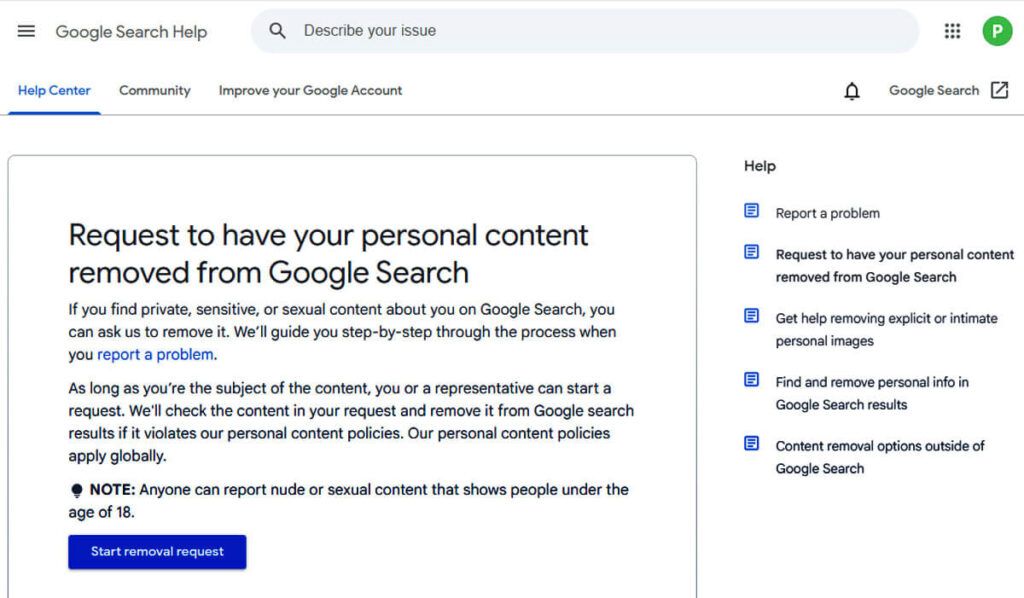
How hard it is to remove your personal data from Google depends on the type of information and where it’s posted.
If your information is on a site you don’t control, it can take a while to find the owner and get a response, and there’s no guarantee they’ll help.
Legal removals usually have extra steps and requirements.
Knowing how the system works is important, since you might need to submit the right requests and documents.
Even after you’ve cleaned up your information, new mentions can still show up unexpectedly.
Think of this as an ongoing process, not a one-time fix. Be ready to repeat some steps to stay on top of new issues.
An Insightful Guide to Managing Your Online Presence
Step 1: Begin with a Quick Google search
Today, managing your online presence is more important than ever. For example, when you open Google Chrome, you see its familiar and simple layout.
To see search results that are less tailored to you and more like what an average user would see, use the private browsing feature.
Private browsing lets you search without your past activity affecting the results.
Search on Google and Google Images
This way, you can see the main Google results and browse the wide range of images on Google Images.
Don’t stop at the top results. Explore the Images tab to find even more information.
In the Images tab, you might find profile pictures, screenshots, and other formats that don’t always appear in regular searches.
To get a full picture of what’s online about you or a topic, check at least the first three pages of results in each category.
The News and Videos tabs are also helpful for real-time updates. They often show names and details related to your search.
As you review the results, keep in mind that important information might not appear in the main listings. It’s often found in the Image, Video, and News sections.
To stay organized, make a list of URLs you want to look into more or might want to remove.
A simple spreadsheet can help. Add columns for the URL, site owner, what information is visible, and your next steps.
This careful approach takes some effort at first, but you’ll see the benefits when you start sending removal requests.
Step 2: Manage Your Online Presence
Remove Information from Web Pages You Manage
Start by focusing on what you can control, like the platforms and websites you manage.
Social Media
The first step is to eliminate any sensitive information from your social media profiles.
Remember, social networks can quickly spread sensitive posts, which might lead to privacy issues.
If an account makes you feel too exposed, consider deactivating it for a while while you address any problematic content.
No matter if you use Facebook, Instagram, X (formerly Twitter), TikTok, Pinterest, or Snapchat, all of these can be misused to share your personal data.
If you can’t deactivate the account, focus on editing old posts, changing privacy settings, and removing personal details like addresses, phone numbers, or ID numbers.
For example, to enhance your privacy on Facebook, you can modify your settings to disallow search engines from linking to your profile.
This simple step can greatly lower how visible your information is in search results.
Here’s how you navigate these privacy settings on Facebook:
- Just click on the downward arrow or tap your profile picture in the top right corner—it’s that simple!
- Choose “Settings” from the dropdown menu inside the “Settings & Privacy” section.
- In the left column, choose “Privacy.”
- Find the setting labeled “Do you want search engines outside of Facebook to link to your profile?” and click on “Edit.”
- Thoroughly evaluate your choices to select the one that best aligns with your privacy needs.
Managing Your Website Domains

If you have your own website, log in and remove or edit any sensitive information that’s still there.
If needed, update any media or PDFs with personal details. You can replace them with a secure contact form or a PO box for people to reach you.
If you can’t access your website, contact your domain or site administrator for help. You may need to prove your identity to make changes.
Taking Control of Your Blogs
If you blog on WordPress, HubSpot, Blogger, Weebly, or Wix, log in and edit or remove any posts or media with sensitive content.
If you share your blog with others, let your co-authors know your plans so you can avoid sharing sensitive information in the future.
Instead of deleting content, try updating it when possible. This maintains its SEO value while protecting your personal information.
Managing Professional Profiles
Sites like LinkedIn often show your photo, location, and work history, and these profiles usually appear high in search results.
Adjust the visibility settings for this information, or turn off your public profile if you feel too exposed.
It’s also important to check and limit what’s visible on job sites like Indeed or Monster, where your resume is posted.
After making these changes, make a list of URLs to help you update your Google search results faster.
Step 3: Connecting with Webmasters on External Websites
If your information is on websites you don’t control, contact the web admins or site owners to ask them to remove it at the source.
Remember, just hiding a page from Google doesn’t stop people from finding it through direct links, social media, or other search engines.
That’s why it’s important to remove the information at its source to protect your online presence fully.
To find the right person to contact, check the website’s “About,” “Contact,” or “Staff” pages.
Reaching out to a specific person, such as an editor, writer, or publisher, usually yields faster results than emailing a general inbox.
Be clear about which URLs and information you want removed when you make your request.
Keep your message short, polite, and specific. Make sure you clearly explain what you’re asking for.
Using WHOIS to Find Contact Information for a Website
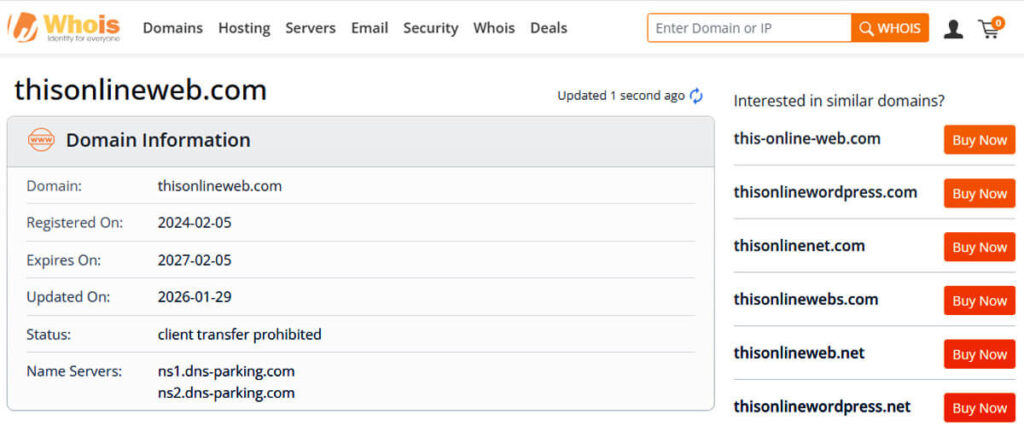
To begin finding contact details for a specific domain, start with a WHOIS or RDAP lookup.
This approach is especially helpful when a domain lacks clear contact information.
Keep in mind that GDPR rules have hidden many personal data fields in WHOIS records.
If these details are hidden, try using the reporting or abuse form on the domain registrar’s or hosting service’s website to ask your question.
Contact the site’s hosting company.
If your WHOIS search gives you little or no information, try reaching out to the registrar or hosting provider directly.
WHOIS information is often hidden, but the hosting company might still help you find contact details.
If you have trouble reaching the domain owner, try a hosting checker tool or another WHOIS/RDAP search to find the site’s host.
Use this as a last resort. Sometimes, hosting companies will act if their terms of service are broken, especially in serious cases like doxxing or illegal content.
As you go through this process, gather specific URLs, clear screenshots showing the problem, and a short, clear description of your concerns.
Having all this information ready will make it much easier to solve your issue.
Engaging a Reputation Management Company
If you’re struggling with a complex problem, consider seeking assistance from an Online Reputation Management (ORM) company.
These experts know how to contact website owners, handle removal requests, and keep track of exposures to help protect your reputation.
If permitted by policy, ORM companies can also expedite the removal of certain Google pages from search results.
Even if the content stays online, de-indexing makes it much less visible in search results.
If you are not sure where to start, many trusted online reputation management firms can help you with proven results and fair prices.
Step 4: Reaching Out to Google
Contact Google
If the site owner does not respond or you cannot access your account, you should contact Google for help.
You can send a removal request, especially if the content could lead to identity theft, financial fraud, or harassment.
Learn how Google’s removal process works to improve your chances of success.
Types of Removals Available
Google accepts removal requests for several types of content, including:
Doxxing Materials: This includes content that threatens or discloses excessive personal information.
Involuntary Explicit Images: Such as deepfakes or any non-consensual media.
Exploitation via Pay-to-Remove Tactics: Situations where individuals are pressured to pay to have their content removed.
Images of Minors: Particularly those that are shared improperly.
Misleading Content: Pages that inaccurately associate your name with explicit or pornographic material.
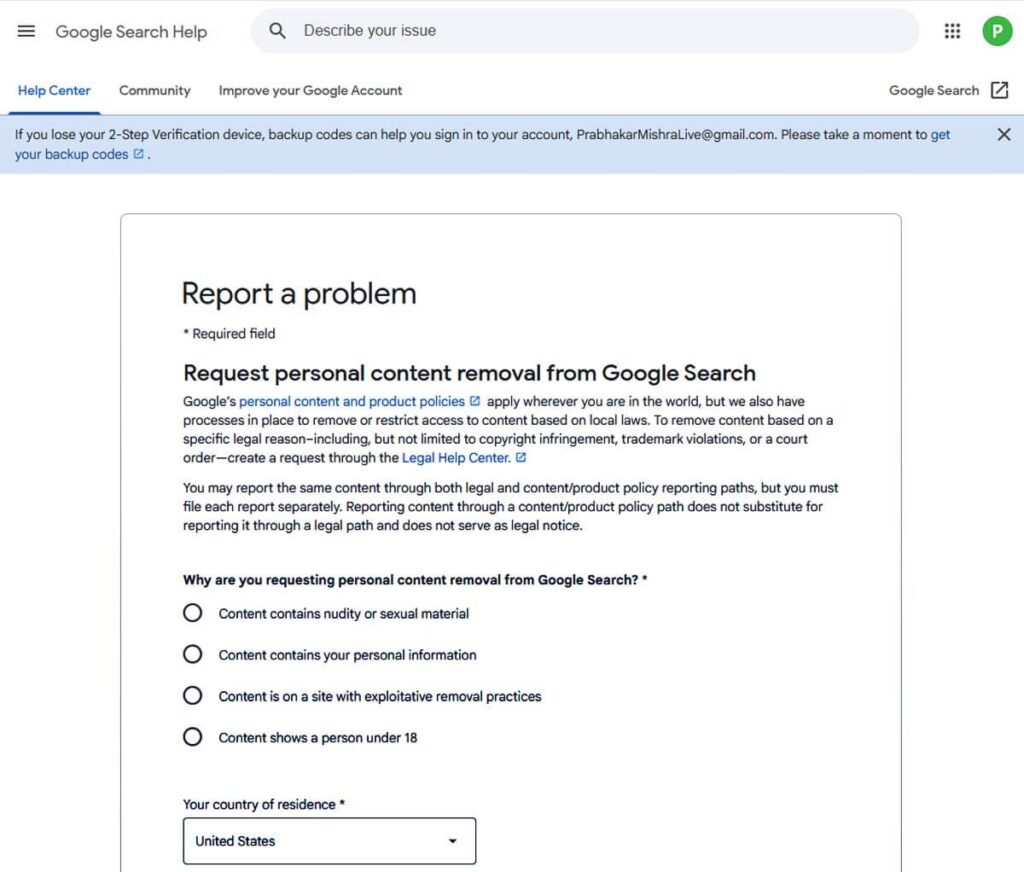
You can start a removal request using the “Results about you” hub or by clicking the three-dot menu (Remove result) in search results.
Be sure to gather the exact URLs and any image links to make the process smoother.
Handling Outdated Content
If a page has changed or been deleted but Google still shows old information, use Google’s Refresh Outdated Content tool to update it.
To remove outdated info from Google Search, go to the Google Search Console request page, but use this option carefully.
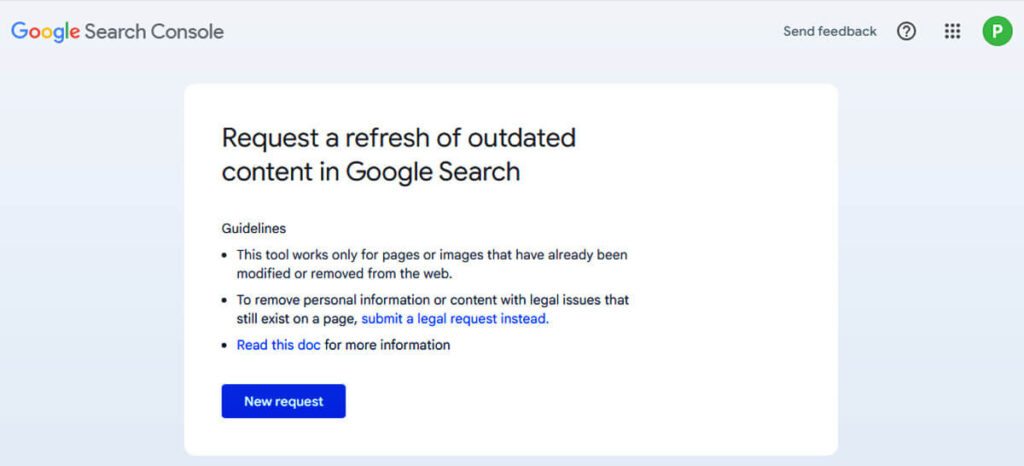
This works best for content that has really been removed or is no longer relevant.
Be careful and do not use this tool in these situations:
When you suspect the material is illegal, harmful, or misleading, use the appropriate legal or policy forms instead.
If you are the verified owner of the content, use Search Console’s Removals tool or request a recrawl.
When you are seeking to delete a public URL from search results permanently, you need to use different removal methods.
If the content is still live and requires recrawling, submit a recrawl request.
Requesting Content Removal for Legal Reasons
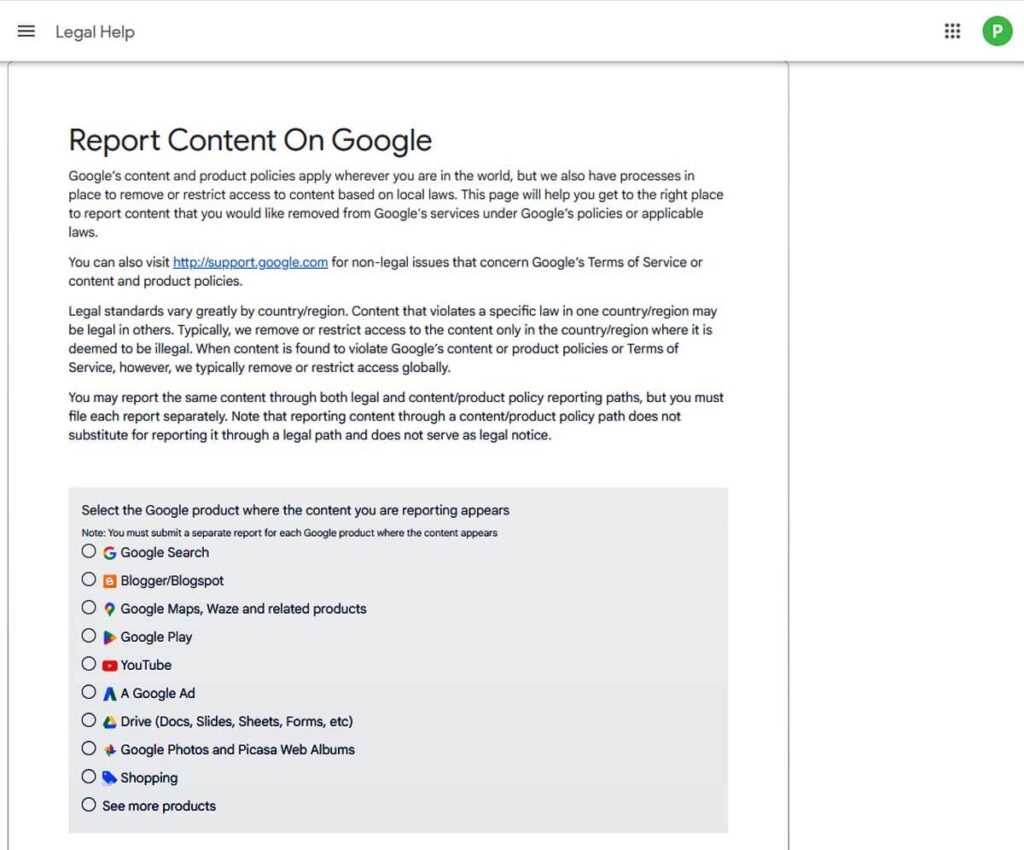
In scenarios involving legal matters, such as defamation, court orders, intellectual property disputes, malware incidents, phishing schemes, or explicit abusive content, use Google’s legal request process.
Providing accurate URLs along with any relevant documentation will greatly assist reviewers in addressing your concerns promptly and efficiently.
Keep in mind that while removing content from Google Search doesn’t eliminate the information from the internet entirely, it does obscure it from search results.
It’s advisable to pair removal requests with action taken at the source whenever feasible.
Step 5: Opting Out of Data Brokers
Today, many websites and companies collect, analyze, and profit from our personal information, often without our knowledge or clear consent.
This constant monitoring can make people feel exposed and more at risk of identity theft and targeted ads.
To regain your privacy and control your digital identity, you need to identify these data brokers and ask them to remove your personal information from their databases.
Some well-known data brokers are Whitepages, Spokeo, and PeopleFinder.
These companies collect extensive personal data, including names, addresses, phone numbers, and sensitive financial information such as income and property details.
If you visit their websites, most brokers offer instructions on how to opt out. Usually, you’ll need to verify your identity by following a few steps.
Opting out helps reduce your digital footprint and adds a layer of protection against the misuse of your personal data, such as stalking or other harmful actions.
In a world where information can be misused quickly, taking these steps helps you protect your privacy and regain control.
This is an important first step toward controlling your online presence and protecting your personal data.
Step 6: Reporting Inappropriate Content
If your personal information appears on websites that violate your rights or share harmful or defamatory content, it’s important to act quickly and decisively.
Use Google’s reporting tools, such as their online form for legal removals or the process for flagging harmful content, to ensure these problems are reported quickly.
You’ll usually need to give details about the content and provide evidence to support your claim.
By doing this, you help make the online world safer and support efforts to keep it respectful for everyone.
Your behavior can contribute to stopping the spread of harmful content and protecting everyone’s online privacy rights.
When you stand up against misuse, you speak up for yourself and for many others online.
Working together in this way shows how important accountability and ethical behavior are in our connected world.
Step 7: Removing Information from Data Collection Websites
Delete Information From Collection Sites
It can take some effort, but removing your personal information from data collection websites can really help limit public access to your private data.
You might not be able to remove everything, but the goal is to shrink your digital footprint as much as you can.
Start by finding out which data brokers and people search sites have your information.
You can use Google to find different data collection sites.
Make a checklist of well-known sites and go through each one, asking to have your information removed.
Taking these steps can greatly improve your privacy and give you more control over your personal data.
Harnessing Google for Data Collection Websites
Begin by using Google to find data collection websites that fit your needs.
Make a list of people-search and data-broker companies you find.
Begin with well-known platforms such as BeenVerified, Spokeo, Radaris, Whitepages, Intelius, and MyLife.
If you want a simpler, automated option, consider using online reputation monitoring services to help manage your online presence.
Opting Out: Taking Charge of Your Online Footprint
You can proactively manage your online presence.
To remove your information, go to the opt-out page on each website. You can usually find this link at the bottom of the homepage.
If you can’t find the link, check the site’s privacy policy or search for “[site name] opt out” for instructions.
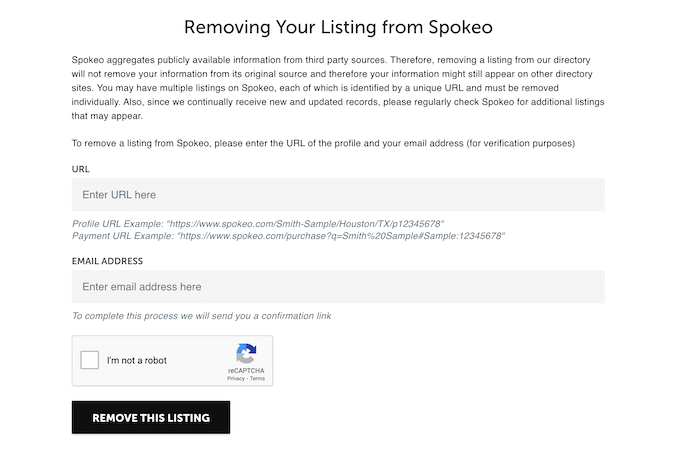
For example, when attempting to opt out of Spokeo, follow these detailed steps:
Visit Spokeo.com and enter your name or relevant search criteria to locate your profile in the search results.
Click your profile in the search results to open it, then copy the URL. Usually, you can see your listing without needing an account or payment.
Next, visit Spokeo’s opt-out page. You can find it with a direct link or by searching online.
On the opt-out page, paste the URL, enter your email address, and complete the CAPTCHA.
We’ve just sent you a verification email! To confirm your opt-out request effortlessly, click the link inside.
If you need any help, don’t hesitate to reach out—we’re here for you!
We are committed to keeping this process straightforward and transparent for your convenience.
Most data brokers use a similar process so that you can follow these steps for other sites as well.
Spokeo Opt-Out Form and Detailed Instructions
Use the opt-out form on each website and confirm your request by email.
Your information is usually removed within one to two weeks.
Set a reminder to check the site and make sure your profile is gone.
If your information is still there, submit another opt-out request if needed.
Step 8: Carefully Monitor Your Personal Information
Even after your information is removed, keep an eye out, as it might reappear.
Set up a regular schedule to check for new listings and act quickly if you find any.
Take time to review alerts and send new removal requests when needed to keep your information safe.
Setting Up Alerts for Proactive Monitoring
Set up Google Alerts for your name, your business names, and any common variations to stay informed.
You can select to get these alerts in real time, daily, or weekly—whichever suits you best.
You can also pick which types of sources you want alerts from.
The “Results About You” dashboard can help you find and remove your personal information online more quickly.
For extra peace of mind, check the dark web regularly to see if your data is there. If you find anything, reset your passwords and take steps to protect yourself.
You might also want to use trusted reputation management services that offer proactive monitoring.
These services can handle removal requests for you, which saves you time and effort.
Considering Legal Action if Needed
If a website keeps reposting your information or refuses your removal requests, consider talking to an attorney about your legal options.
Taking legal action can help in some cases, especially if there are false statements or you want to seek damages for reputational harm.
Keep in mind that legal action can be costly and time-consuming.
Often, a formal letter from a lawyer is enough to achieve results without further action.
Only consider going to court if the situation really calls for it.
Usually, sending a clear removal request and following up regularly works faster and with less stress.
If you’re unsure, talk to a lawyer before starting any legal action.
Need Assistance?
If the opt-out process feels overwhelming or takes too much time, you can contact top online reputation management firms with proven success in handling these issues.
They can help you feel more confident in managing your online presence and keeping your personal data safe and under control.
Building an Audience And Starting Your Business #1 Easy Steps
The Top 12 Easy Tactics To Market Your Company On A Budget!
12 Powerful Key Insights Eye Tracking Research and Studies
7 Easy Steps: How to Increase Revenue Without New Customers
8 Easy Essentials To Reputation Management for Celebrities