




Here’s a helpful guide: how to remove Google Search Results in 9 easy steps. It covers everything from removing unwanted pages and blocking URLs to using Google Search Console’s Removals tool and requesting content removal.
Whether you’re managing social media profiles or safeguarding your online reputation, these tips can make your digital space more secure and welcoming.
Remember, you can always submit a removal request or hire experts to assist you.
Keep monitoring your online presence to ensure it reflects the best version of you!
Some links in this post may earn me a commission, since This Online Web is supported by its readers.
Still, my opinions and recommendations are always honest and not influenced by any commissions.
If you’ve ever Google your own name, you might have seen results that are old, misleading, harmful, illegal, or reveal your personal details.
This can be worrying, since if you can see this information, so can everyone else. That’s why managing your online reputation is so important.
The good news is that there are several simple ways to hide or even remove unwanted content, especially if it violates the law or Google’s policies.
Even if some results stick around, there are smart ways to make them less visible in search results.
9 Easy Steps on How to Remove Google Search Results

If you’re dealing with unwanted search results, getting help from a professional reputation management service is often the best option.
These companies can assess your situation, take the right steps, and often deliver better, faster results than you could achieve on your own.
If you need urgent help, you might consider trusted companies such as Reputation Defense Network, Better Reputation, Erase.com, and NetReputation.
These firms handle the removal process for you, so you can relax while they deal with the details of online reputation management.
But if you’d rather handle this yourself, here are some steps to help you get started:
Begin with what you can control, like your personal website, blog, or social media profiles.
Update and improve these platforms to build a positive online presence.
Next, figure out which results you can’t control, like articles on other websites or public records that show you in a bad light.
Feel free to reach out to the website owners or administrators if you need help with removing any unwanted content. They’re usually happy to assist!
Be clear and brief in your request, and explain why the content is harmful or wrong.
If needed, fill out Google’s removal request form to try to get certain results taken out of search listings.
This works best for content that violates the law or violates Google’s rules.
After you’ve made your requests, check the search results to see if the unwanted content is gone or less visible.
If your own efforts aren’t working, it might be time to get help from a professional reputation management company.
These steps may look simple, but they often take a lot of time and patience.
It’s common to wait weeks or even months before you know if your removal efforts worked.
I don’t want to discourage you, but I do want you to be prepared and informed.
If your first attempts don’t work out, a reputation management service can be a good backup plan.
When is it Easy to Remove Google Search Results?
Sometimes, getting unwanted content removed from Google is pretty simple.
Removal usually happens faster if the content is illegal, breaks Google’s rules (like sharing personal info or doxxing), has sensitive details, misleads people, or is no longer online.
You can often fill out and send removal requests in just a few minutes.
But keep in mind, it can take days or even weeks for these requests to be reviewed, so don’t expect instant results.
When Things Become Challenging
On the other hand, removing content can be very difficult, especially if it’s a news article, public record, or registry entry.
In these cases, you might need legal documents, such as a court order, or keep contacting the website owners to request that the content be removed.
You may need to file a copyright claim, get a court order, or show that the content breaks Google’s rules or the DMCA to get it removed.
Usually, you’ll need to contact the site administrator to request that the content be deleted or hidden from search engines.
But remember, this process doesn’t always work and can often take a long time or involve tough negotiations.
Step 1: The Bottom Line? Begin with the Content You Manage
Getting rid of unwanted search results takes work and patience.
Whether it takes days or months, staying determined is key.
Start with the content you control. That’s the easiest place to begin.
Work on updating and improving your own platforms, like your website, blog, YouTube channel, and social media, to boost your online image.
Eliminating Unwanted Websites: A Step-By-Step Guide
Remove Unnecessary Web Pages
Improving your online presence starts with removing any unwanted or outdated content from your website.
This process helps ensure your website reflects your current standards and values.
Here’s a step-by-step guide to help you do this in WordPress:
Access Your Dashboard
To get started, log in to your WordPress dashboard.
From here, you can manage everything on your website.
Manage Your Posts and Pages
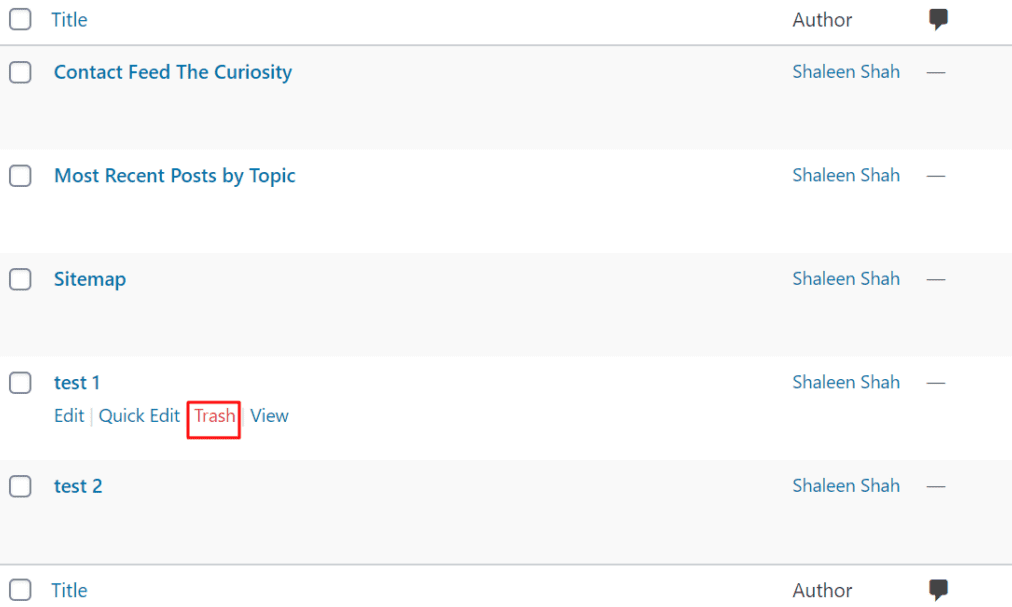
Use the admin panel to find your posts and pages.
To remove a post or page, hover over its title. You’ll see several options appear below.
Click “Trash” to take it off your site and keep things tidy.
You’ll feel good seeing your website look fresh and up to date.
Exploring the Trash Folder
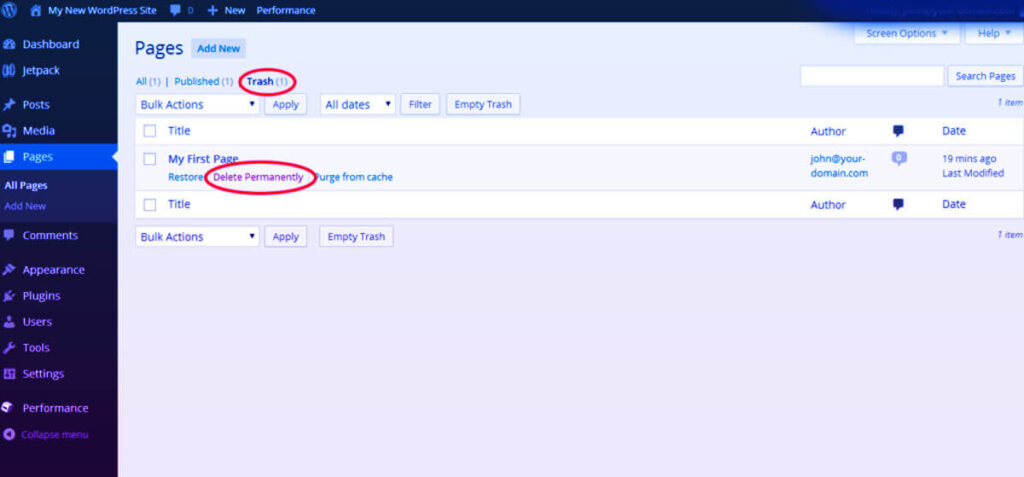
When you click “Trash,” the content is moved to the Trash folder.
This lets you restore anything later if you change your mind.
To fully clean up, you’ll need to delete the content from the Trash folder permanently.
A clean site, free of extra clutter, is always satisfying.
Prevent Search Engines from Indexing Deleted Content
Block the URL from Google Search Results
Keep in mind that Google may still show deleted pages in search results unless you ask for their removal.
You can use Google Search Console’s Removals tool to delete cached versions and temporarily hide a page from search results.
For a permanent fix, either delete the page or block it from being indexed.
Temporary removals usually last about six months.
To do this, follow these steps:
Open the Google Search Console.
Navigate to the “Removals” section and select “Temporary Removals.”
Click on “New Request.”
Choose either “Clear cached URL” or “Temporarily remove URL,” then follow the prompts to finish your request.
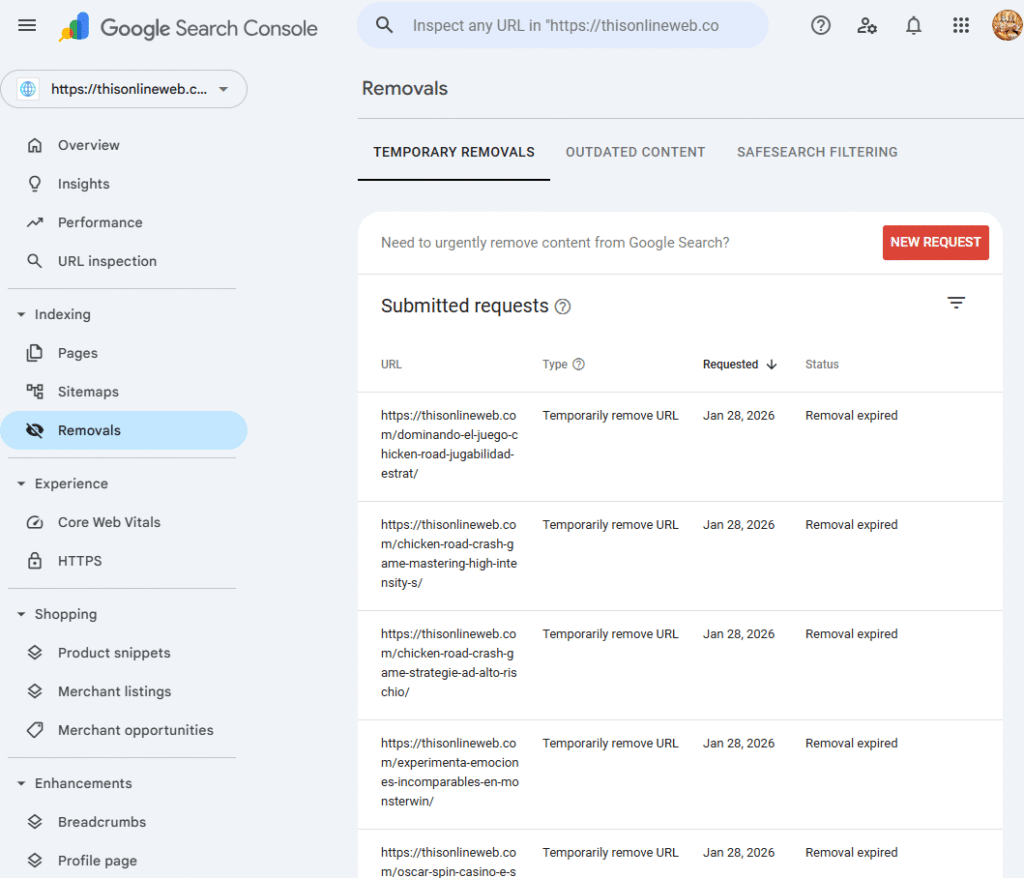
It’s reassuring to know that your deleted content won’t appear in search results for a while.
Implementing Noindex Tags
Prevent Indexing of Future Content
If you want to keep content on your site but hide it from Google, add a noindex tag to the page’s HTML head section.
Insert this tag:
<meta name=”robots” content=”noindex”>
This tag instructs search engines to avoid indexing this specific page.
Plugins like Yoast SEO make it easy to add this tag without writing code.
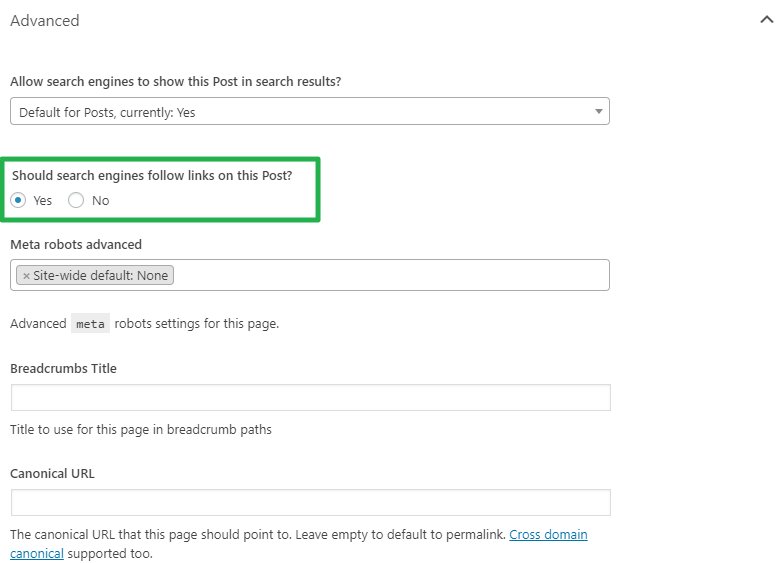
But if other sites link to your content, Google might still index it even with the noindex tag.
If privacy is very important, it’s best to delete the page and block the URL.
Clean Up Social Media Profiles
Your social media accounts matter as much as your website.
Posts on platforms like Twitter (X), YouTube, LinkedIn, and Facebook can keep showing up in search results long after you post them.
Take some time to update or delete any posts you don’t want others to see.
Since YouTube videos often rank high in search results, review your videos to ensure they portray you in a positive light.
Step 2: Recognize Content You Cannot Control
To effectively manage your online reputation, begin by identifying any content that could harm it.
Even if you think you know which pages might damage your image, it’s important to search carefully.
Negative content can show up in surprising places, especially when others post articles, reviews, or social media comments about you or your business without your knowledge.
Finding negative content might seem repetitive, but it’s a key part of managing your reputation.
You can’t fix or respond to content you haven’t found yet.
That’s why it’s important to review your online presence carefully.
Perform a Google Search
Begin by searching Google with different terms related to you and your brand.
Include your full name, your business name, common misspellings, and keywords related to your industry or field.
This approach lets you see what potential customers or clients might find, which helps you spot any high-ranking negative pages.
When you look through the search results, focus on what appears in the first few pages.
Content positioned at the top of search results is the most important, as people tend to click those links first.
If a negative article is buried on page ten but a bad review is in the top three results, you know which one to focus on first.
In the end, this process is about setting the right priorities.
By focusing on the biggest threats to your online reputation, you can take concrete steps to protect your image and maintain your credibility.
Organizing Your Findings
If you only find a few negative results, handling them should be simple.
But if you find several issues, it helps to make a spreadsheet to track your progress.
A spreadsheet is useful because search rankings change often.
It can be hard to confirm removals if a URL moves from page one to page three overnight.
Create a spreadsheet using Google Sheets or Excel.
Include the URL, platform name, type of content, and a notes column to track things like when you contacted a web admin or sent a Google removal request.
By staying organized, you’ll have more control over your online reputation and build a stronger digital presence.
Explore Multiple Content Formats and Sources
Google’s search results include much more than just news articles and blog posts.
It’s important to look closely at less obvious places where harmful or misleading information might appear, such as:
Social Media Platforms: Comments and posts can sometimes be misleading or even harmful.
False information can spread quickly, so it’s important to check if what you see is trustworthy.
Video Content on YouTube: Misinformation can spread fast on video platforms.
Be sure to watch the videos and check the comments and recommendations, as they can influence how people see the topic.
Message Boards and Online Forums: These spaces let people share their thoughts freely, which can sometimes include harmful or false information.
When reading these forums, it’s important to be careful and try to tell what’s true from what’s not.
Customer Review Websites: Sites like Trustpilot, Yelp, and Google Reviews sometimes have negative feedback that isn’t always fair or accurate.
Checking whether reviews are genuine and understanding their context can help you decide whether they’re trustworthy.
Google Images: Pictures can have a big impact. Sometimes, an image is used with a story that’s misleading or paints someone in a bad light.
Be careful when looking at images related to a specific topic or person.
Historical Profile Pages or Company Directories: Old information can still harm someone’s reputation.
Even outdated details can shape how people see you now, so it’s important to pay attention to them.
Keep a careful spreadsheet of any problematic links or information you find during your research, so you don’t miss anything important.
Step 3: Contact the Webmaster to Request Content Removal
Remove the Content
The next key step is to reach out directly to the website owner and request the removal or deindexing of content you cannot delete on your own.
Submit a Removal Request
Be ready for this process to take time and effort, since it doesn’t always work right away.
Still, your efforts can pay off. Start by looking for the website’s About page, Contact page, or footer to find contact details.
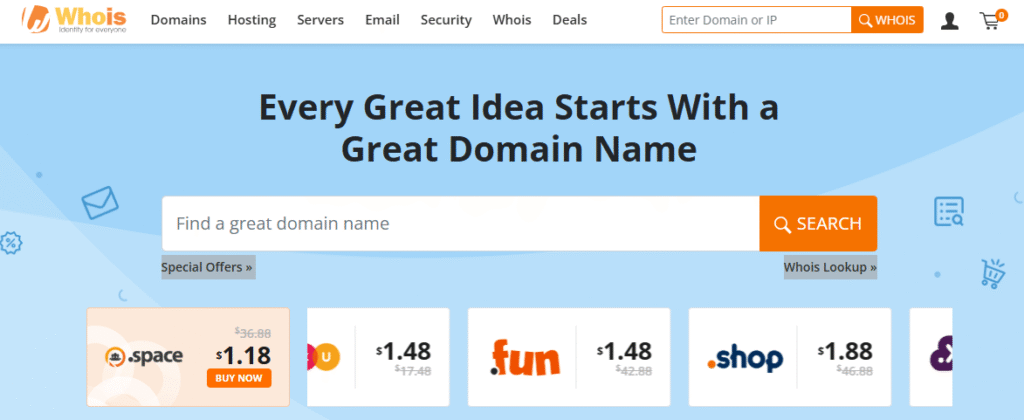
If you can’t find contact details there, try a free WHOIS service like Whois.com or the official ICANN Lookup to find out who owns the domain or which company hosts it.
Understanding Domain Lookup
When you reach out to the webmaster, be polite and professional.
Don’t use emotional or confrontational language, since that can make people defensive.
If possible, try calling them. Talking by phone can help avoid misunderstandings and keep your words private.
Be careful with what you write in emails or messages. Only say things you’d be okay with others seeing.
Make your request calm and clear, and explain your concerns directly.
Once Google re-crawls the page, which usually takes a few days to a few weeks, you should see any changes you agreed on in the search results.
If WHOIS privacy hides the contact details, a reputation management firm may have better tools to help you find the site owner.
Request a No-Index Tag Instead
If the web admin denies your removal request, you can suggest adding a noindex tag to the page instead.
This tag instructs search engines to exclude the page from search results, making it easy to protect your privacy.
The specific noindex tag that needs to be added is as follows:
<meta name=”robots” content=”noindex”>
Also, ask them to remove your name and any other personal details from the page’s metadata, like headers, descriptions, and titles.
Doing this can make it much less likely that your content will appear in searches for you.
Step 4: Request Google to Remove the Search Result
Ask Google to Remove the Search Result
In some cases, even if the content is still online, you can ask Google to remove the search result from its listings.
If Google approves your request, it will deindex the link so it won’t show up in future searches.
Evaluate Your Situation for Eligibility
Remember, there isn’t a single solution that works for everyone.
Still, Google has removal policies for cases involving sensitive or offensive material.
Content Removal Guide: Protecting Your Online Reputation
As the digital world changes quickly, managing your online presence is more important than ever.
If you are facing harmful content online, such as explicit material or personal information that could put you at risk, this guide will walk you through steps to address these issues.
Types of Content Allowed for Removal
Google lists several types of content that can seriously impact your privacy and safety.
The following categories are eligible for removal:
Explicit or Sexually Exploitative Content: This covers graphic material or anything that takes advantage of people, which can harm your dignity and reputation.
It’s important to act quickly to limit the damage from this kind of content.
Personally Identifiable Information (PII): This refers to sensitive details such as your home address, phone number, email address, and other personal information.
If this information gets out, it can lead to serious problems like doxxing or identity theft, so removing it should be a top priority.
Harassing or Threatening Information: Any content involving harassment, threats, or defamation should be taken down.
This kind of content can make online spaces hostile and take a toll on your mental health.
Copyright Violations: If content breaks copyright laws under the DMCA, you can challenge it and have it removed.
This is especially crucial for creators and businesses looking to protect their work.
Right to Be Forgotten Requests in Europe: Some laws let people ask for old or irrelevant personal data to be removed if it’s no longer needed.
Google also has a tool called “Results about you.” This easy-to-use dashboard helps you find and request the removal of personal data linked to your identity.
It also monitors your online presence and sends you alerts to keep you up to date.
Looking for Legal Advice
Dealing with online content removal can be complicated.
It’s a good idea to talk to a lawyer or a reputation management expert for help.
These professionals know how to spot rights violations and can guide you through problems you might not notice on your own.
Submitting a Request to Google for Removal
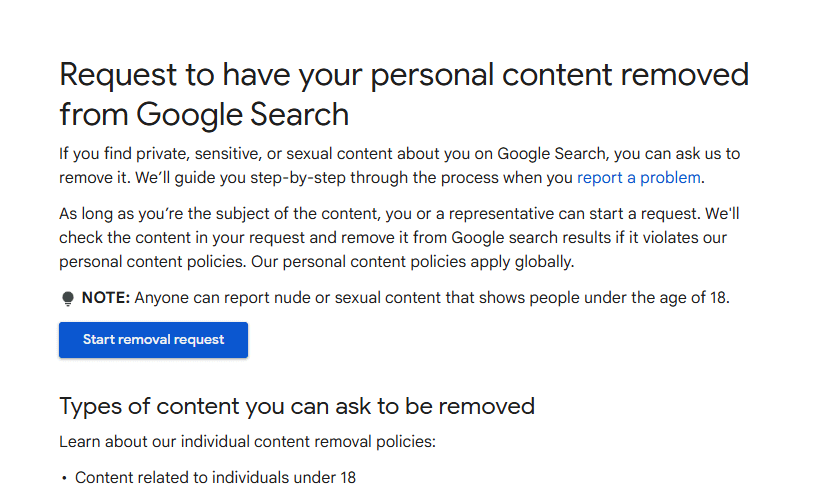
To start a removal request with Google, follow these steps:
Visit the Content Removal Page: Go to Google’s official content removal site to see your options.
Choose a Relevant Category: Look through the categories and pick the one that best fits your situation.
Initiate Request: Click “Start removal request” and follow the step-by-step instructions for your case.
If you live in the EU or UK, make sure to use Google’s “Right to be Forgotten” process to remove your personal data.
By sending this request, you’re taking action to remove certain links from search results, such as:
Sensitive Financial Information: This includes Social Security numbers, credit card details, and bank information, which can cause serious problems if misused.
Identity Verification Images: Scans or photos of ID documents that could be used for identity theft.
Medical Records: Documents with private health information that should stay confidential.
Personal Signatures: Handwritten signatures that could be copied or used in fraud.
Login Credentials: Private account details that should always stay secure and hidden from others.
If there’s a serious breach, like doxxing, where your contact info is shared with threats, Google may remove the content under its harmful content policy.
Awaiting Confirmation
After you send your removal request, you’ll get an email confirming it was received.
Google will let you know if they need more information or clarification.
After review, you’ll be told one of three things:
- The URLs are removed from search results.
- The URLs only disappear from searches with your name or personal details.
- The request has been declined, and you’ll receive a brief explanation.
If your request is rejected, you can talk to a lawyer about appealing or send another request with more information.
Step 5: Verifying Removal Success
Verify if the Removal Was Successful
Once your request is approved, it’s important to check that the unwanted links are gone.
The process is simple, but you’ll need to be patient:
Direct URL Check: Copy and paste the exact URL into Google’s search bar to see if it’s still in the results.
Name Search: You can also search for your name and the website (like “your name site:example.com”) to check for any leftover cached results.
If a page has changed but the old content still appears, use Google’s “Remove Outdated Content” tool to refresh the cache.
Allow for Processing Time
Even after your removal request is approved, changes won’t show up right away.
Google needs some time to recrawl and update the affected pages.
While you wait, focus on creating positive and useful content that can help push down any negative search results about you.
Step 6: Adjust Your Privacy Settings
Set aside some time to review and update your privacy settings on all the social media platforms and websites where you share personal information.
Be cautious to protect sensitive information like your home address, phone number, email, and financial details such as bank or credit card numbers.
Most platforms let you choose who can see your information, contact you, or tag you in posts.
Setting these controls helps protect your personal data from unwanted access and misuse.
Taking these steps improves your online security and gives you peace of mind, since your private information stays hidden from strangers and reduces the risk of identity theft or harassment.
Step 7: Create Positive Content
Spend time building a positive online presence by sharing content that highlights your strengths, achievements, and what makes you unique.
You can accomplish this by creating engaging blog posts, producing videos that showcase your skills, or designing infographics that clearly convey key information.
Try to make your social media profiles reflect your personality, interests, and professional skills, and make sure the look matches your brand.
The more positive content you share, the more likely it is to push down any negative search results about you or your brand.
By doing this, you highlight your best qualities, create a good impression online, and help build a supportive community.
Step 8: Monitor Your Online Presence
Use tools like Google Alerts or social media monitoring to track your search results and mentions of your name or brand services.
This helps you spot unwanted content, negative reviews, or new issues quickly so that you can respond and manage your reputation effectively.
By staying aware, you can control your digital footprint and ensure your online presence matches the image you want to project.
Regularly checking your online presence helps you respond to feedback, connect with your audience, and adjust your approach to protect and improve your personal or professional brand.
Step 9: Hire an Online Reputation Management Company
If you’ve tried everything or want expert help, think about hiring a trusted online reputation management company.
Companies like Better Reputation, Erase.com, NetReputation, and Reputation Defense Network focus on removing content, using suppression strategies, and offering long-term solutions for your online reputation.
For a solution that meets your needs and budget, check out reviews and comparisons of the top reputation management firms.
Taking action now can make a big difference to your online image for years to come.
Building an Audience And Starting Your Business #1 Easy Steps
The Top 12 Easy Tactics To Market Your Company On A Budget!
12 Powerful Key Insights Eye Tracking Research and Studies
7 Easy Steps: How to Increase Revenue Without New Customers
8 Easy Essentials To Reputation Management for Celebrities